
In the article “iOS GUI Architecture: Concepts, Boundaries, and Common Pitfalls”, we demystified what is and what is not GUI Architecture. We also showed that it is not mutually exclusive with state and software architecture, navigation, or design patterns. Additionally, I provided a small table with common patterns and architectures.
The article you’re reading now is a direct successor to the previous one. Initially, my idea was simply to create a repository and implement the same app using a few different architectures. After finishing the code, though, it felt insufficient. Even if the differences are clearly visible, it may not be obvious how things work and why they work the way they do.
Because of that, both articles came from the same need: to better explain UI architectures and clarify the differences between them.
If you’re curious to look at the produced code, here’s the repository link.
We will not discuss CLEAN, VIP, VIPER, or SwiftUI GUI architecture in depth in this article. VIPER, VIP, and CLEAN are software architectures that organize the system beyond the UI layer. As for SwiftUI, it is a state-driven framework that fits very well with MVVM. Its view construction is declarative rather than imperative, so even though it is technically possible to implement architectures such as MVC or MVP, there are no real benefits in doing so, and it doesn’t make much sense.
About the App
The app built to compare the architectures is a counter with a single responsibility: incrementing the count when the user presses a button. It has only one screen with three elements: the counter label, the increment button, and the app header.
MVC – Model-View-Controller
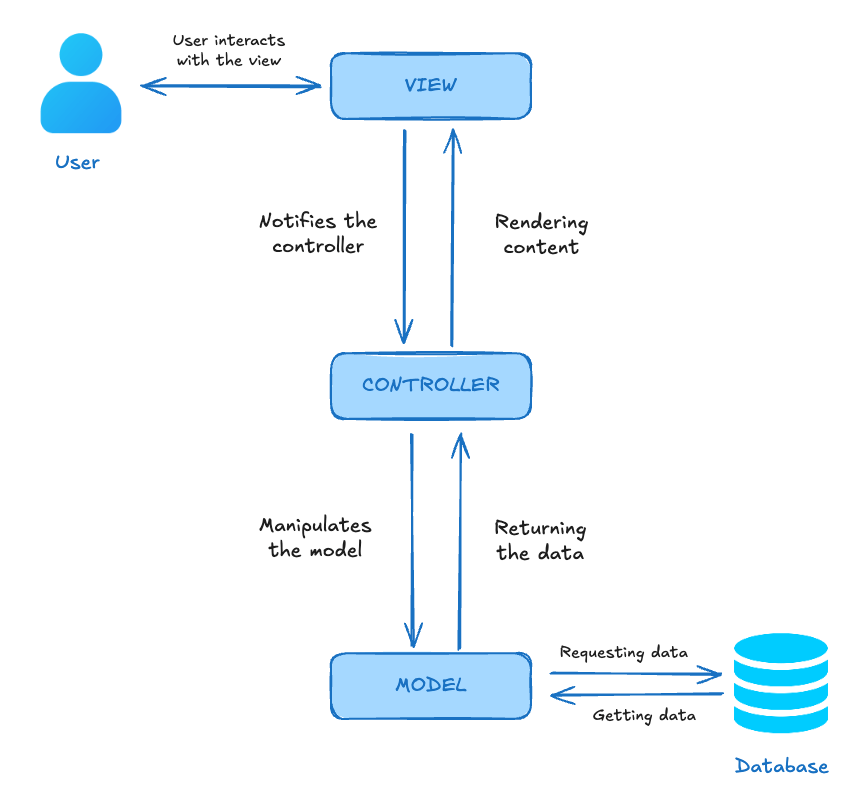
MVC (or Model-View-Controller), even if by accident, was probably the first architecture you used if you started developing with UIKit. Because the ViewController is related to both the View and Controller layers, it feels almost intuitive to accumulate presentation variables, logic, and state inside it.
It enables very fast development with little verbosity. However, as we’ll see, all this convenience comes at a high cost in terms of scalability and testability.
Model-View-Controller vs Model-ViewController
One point that often confuses developers is whether this architecture has two or three layers. This confusion comes not only from the name ViewController, but also from how frequently we see ViewControllers (including in production apps) containing a lot of View-layer code mixed into them.
It’s extremely important to be clear from the start: this is a three-layer architecture, not two.
Below, I’ll explain each layer in detail.
Model
The Model layer handles data persistence and the application’s business rules. At least, that’s how it should work. Unfortunately, in many apps, reality is very different.
It’s far more common to see anemic models that resemble DTOs more than real objects. As a result, most (or nearly all) business rules end up accumulating in the Controller layer.
This concentration of responsibility in the Controller leads to the monster we know as the massive ViewController or god class. This is bad because the ViewController already violates the single responsibility principle by default. Turning it into a god class only makes things worse.
View
This is the graphical interface that displays all visual components and allows the user to interact with the app. Data coming from the Model layer is presented by this layer in a user-friendly way (but it’s important to emphasize that this layer is not responsible for presentation logic).
The View has no business rules, nor presentation rules. It is a “dumb” layer.
When thinking about the View layer, think about Storyboards, XIB files, and, of course, UIViews built with view code that you use inside the ViewController.
Controller
The Controller connects the View and Model layers. It stores the Model’s state and coordinates user interactions and UI updates.
All presentation logic lives here. In other words, it takes raw data from the Model and transforms it into something that can be displayed in a user-friendly way by the View.
It’s very important not to confuse presentation rules with business rules. The business rules are the responsibility of the Model layer.
Why MVC Is Not Viable for SwiftUI
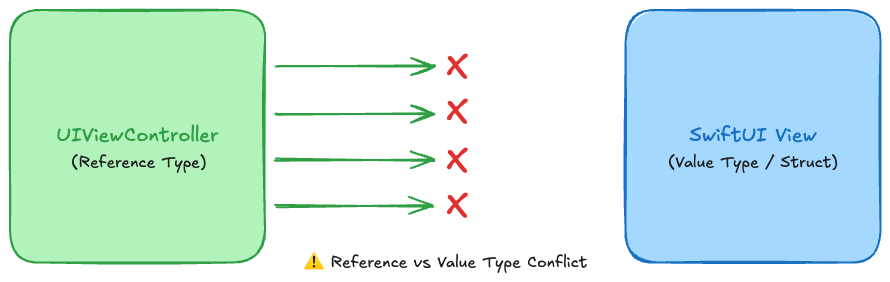
There is a major conceptual mistake in trying to apply MVC with the SwiftUI framework, and that mistake is simple: there is no ViewController in a SwiftUI view.
There’s also another problem: SwiftUI views are not persisted objects to be controlled; they are state-driven functions.
There are some people who advocate using MVC with SwiftUI, but once you dig into the implementation details, it becomes clear that what they’re actually doing is MVVM with the ViewModel layer simply renamed to Controller. To me, that makes no sense. If only the name changes, it’s far better to stick with standard, widely accepted terminology instead of creating unnecessary mental overhead.
Instead of trying to adapt a model that doesn’t fit SwiftUI prototypes, use MV or MVVM.
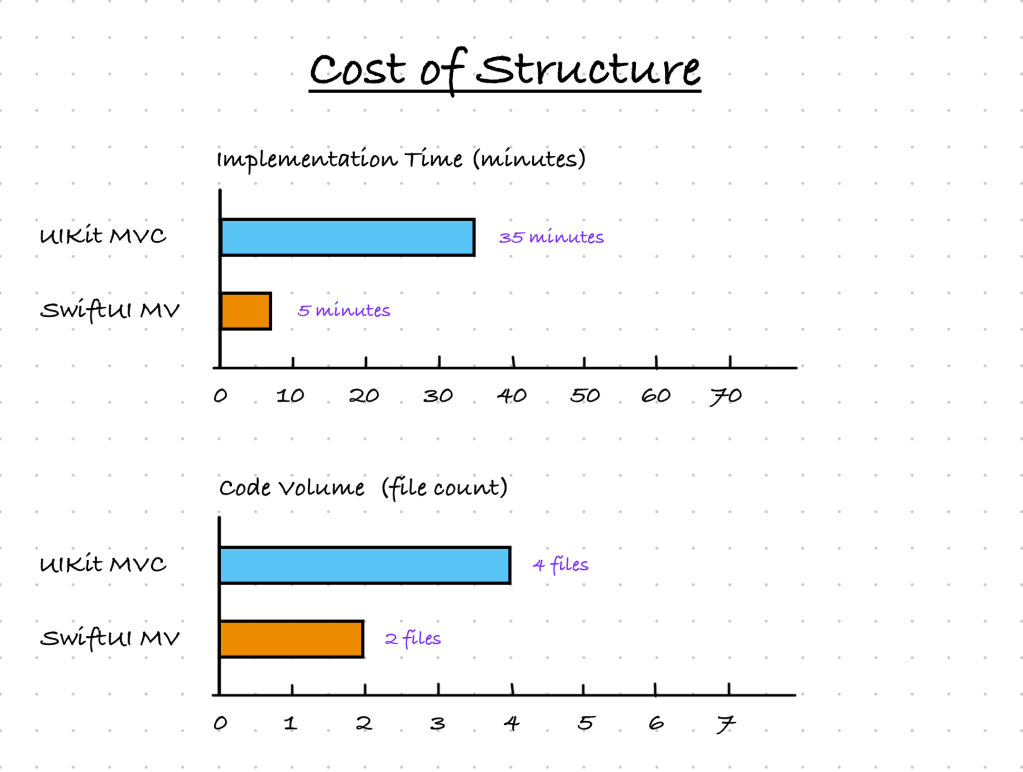
With MV, you can build screens using just one or two files, depending on the complexity of your model. In the example below, you can see our ArchCounter fully built using a single file. More specifically, a single view.
You can still move count into a separate object if you want. That would make the Model layer explicit and ensure a clear separation between the two layers. But is it worth it? In this case, no.
struct CounterView: View {

  @State var count: Int = 0

  var body: some View {
    VStack {
      HStack {
        Text("MV ArchCounter")
          .fontWeight(.semibold)
      }
      .frame(height: 44)
      .frame(maxWidth: .infinity)
      .background(
        Color.blue
          .ignoresSafeArea(edges: .top)
      )
      ZStack {
        Text(String(count))
          .font(.largeTitle)
        Button {
          count += 1
        } label: {
          Image(systemName: "plus")
            .foregroundStyle(.white)
        }
        .background(
          Circle()
            .frame(width: 56, height: 56)
            .foregroundColor(.blue)
        )
        .frame(maxWidth: .infinity, maxHeight: .infinity, alignment: .bottomTrailing)
        .padding(32)
      }
      .frame(maxWidth: .infinity, maxHeight: .infinity)
    }
  }
}

#Preview {
  CounterView()
}
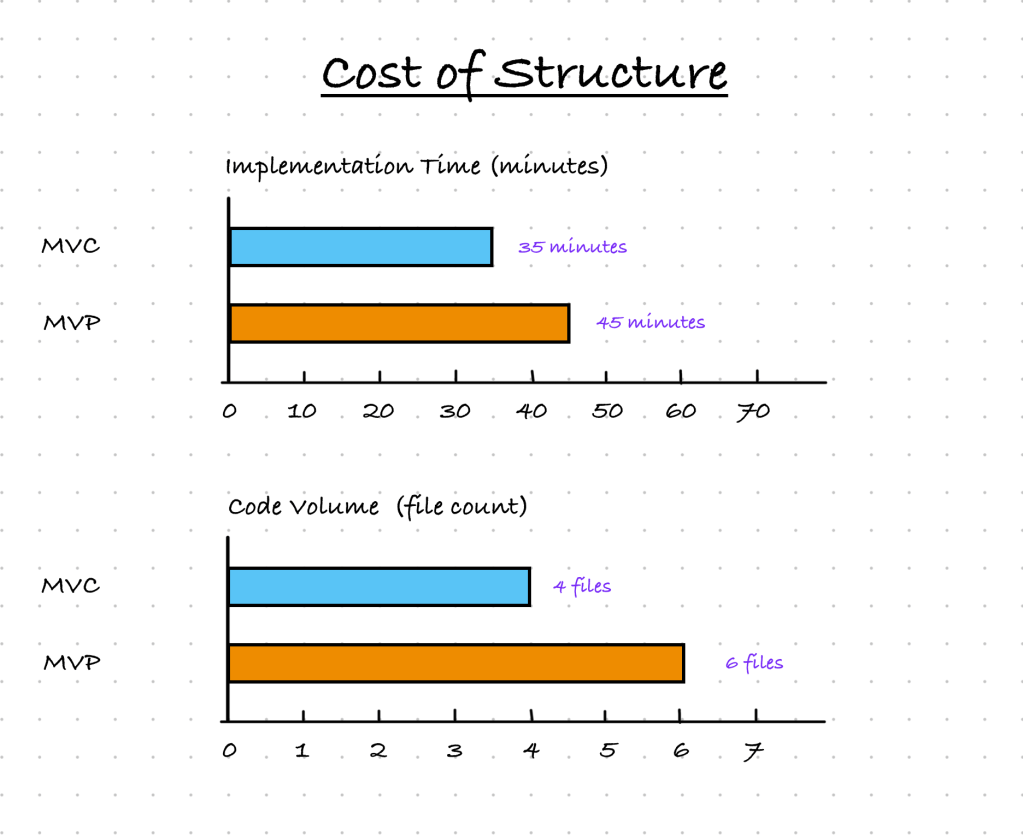
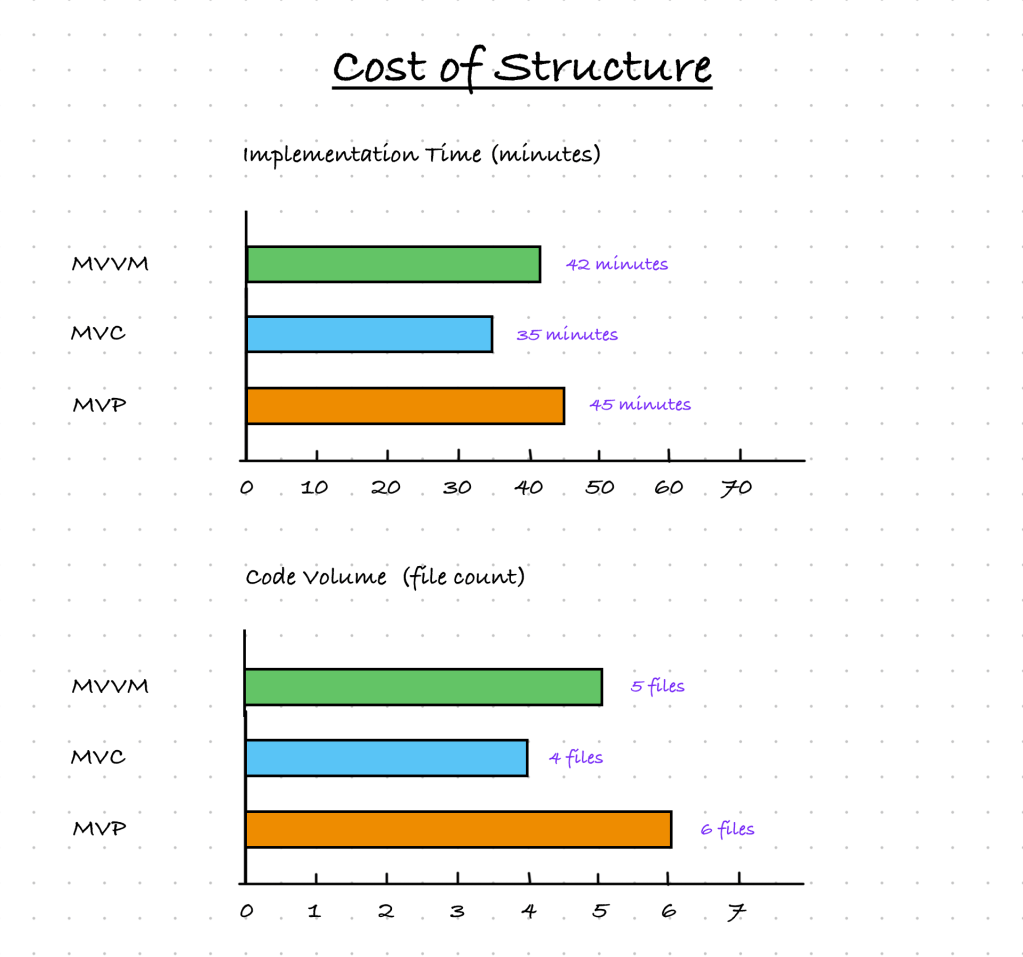
Since I won’t explain MV here, I’ll leave a brief comparison of implementation time and code volume between one architecture and another:
Final Thoughts on MVC
Use it only when working on an MVP (minimum viable product), a small project, or for educational purposes. If your software is medium or large in size, needs to be well tested, or may eventually be shipped to production, choose an architecture that better isolates layers and scales more effectively.
MVP – Model-View-Presenter
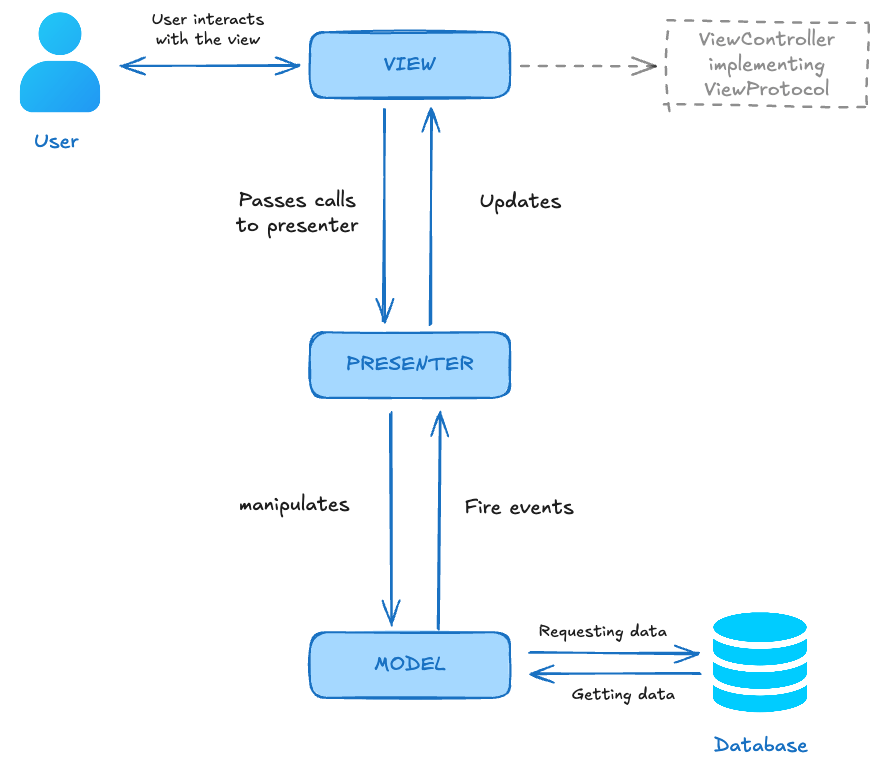
In MVP (or Model-View-Presenter), the ViewController has fewer responsibilities. The View implements an explicit contract through a protocol, defining only the methods that can be called to update the UI.
The Presenter holds the model state and orchestrates the logic. This significantly improves testability and makes the flow more predictable. On the downside, the architecture becomes a bit more verbose. Since this architecture does not depend on the framework, it is easier to test.
Model
As in MVC, the Model basically handles data persistence and the application’s business rules. When data changes, the Model notifies the Presenter.
In many applications, the same problem found in MVC can occur here as well: Model objects becoming anemic, while the Presenter layer ends up overloaded.
Presenter
Responsible for mediating communication between View and Model. All user interactions with the View are forwarded to the Presenter, which then manipulates the Model. When data changes in the Model layer, the Presenter is responsible for updating the View layer.
Just like the Controller, the Presenter can become massive. Moreover, it can naturally run into SRP issues, since it carries all presentation logic, may contain business rules (if implemented incorrectly and the Model layer is anemic), and may also be responsible for deciding navigation flows, especially if there is no Navigation Pattern in place to help, such as a Coordinator, Flow, or Router.
View
The MVP View layer is a bit more interesting than in MVC for one simple reason: we now have contracts (interfaces/protocols). Before going deeper into that interface, it’s important to clarify that View-layer logic is not contained in the UIView itself, but in the ViewController.
For each screen, we’ll have a protocol to be implemented, for example:
protocol CounterViewProtocol: AnyObject {
  func render(title: String)
  func render(value: String)
}
The ViewController implements this protocol, while the Presenter holds a weak reference to the object that implements it, so it can call the update methods.
// CounterPresenter receives the reference of the current ViewController
// but actually it is expecting a `CounterViewProtocol?`
// so it is important to make the ViewController conform to this protocol
private func setupPresenter() {
  presenter = CounterPresenter(view: self)
  presenter.viewDidLoad()
}

extension CounterViewController: CounterViewProtocol {
  func render(title: String) {
    counterView.render(title: title)
  }

  func render(value: String) {
    counterView.render(value: value)
  }
}
Below is a graphical representation of this model:
Why MVP Is Not Viable for SwiftUI
SwiftUI follows a declarative paradigm, while MVP proposes a Presenter that holds a reference to the View in order to update it imperatively. This paradigm mismatch is one of the reasons it doesn’t work.
The second issue is the same one mentioned earlier: SwiftUI views are structs, while UIKit views are classes. In other words, there’s a fundamental conflict between reference types and value types.
Final Thoughts on MVP
I wouldn’t use it for anything other than educational purposes. Serious work with this pattern should be limited to legacy projects or systems where it has already been established for a long time.
Of course, compared to MVC, it isolates responsibilities much better and makes the code far more testable. Still, it has the same issues mentioned earlier, such as the Presenter turning into a god class.
You could argue that MVVM also runs the risk of producing a god-level ViewModel, and I agree. However, MVVM has some clear advantages over MVP, most notably reactivity and the fact that MVVM is far more widespread in the market today.
By the way, a small correction: MVP can be quite useful for scaling apps written in Objective-C, since applying MVVM with that language is more difficult, and MVC has all the issues we’ve already discussed.
MVVM – Model-View-ViewModel
We’ve finally reached MVVM, one of the most common architectures in mobile software development.
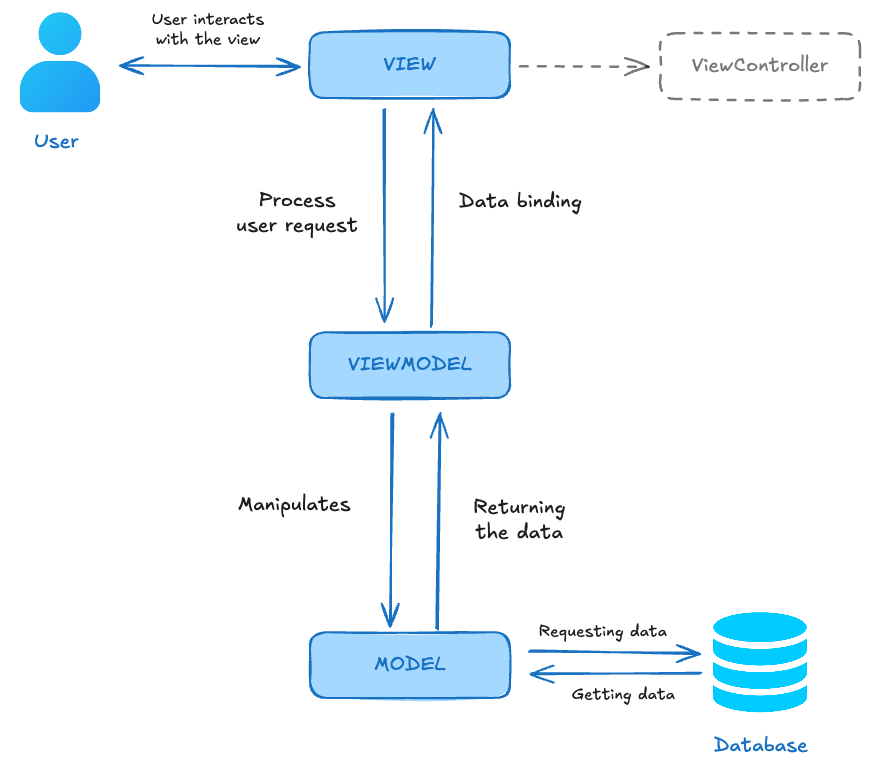
As mentioned earlier, MVVM brings a major advantage to our app: reactivity. This allows us to stop relying on a layer that imperatively updates the view, as Presenter and Controller do. Instead, whenever there’s a change in the model, the ViewModel, which is being constantly observed, will notify the view, which then binds to the new information.
The View never talks directly to the Model. The ViewModel always acts as a bridge, centralizing state and the transformation logic required for presentation.
Model
There isn’t much to say about the Model. It continues to play the same role it does in MVC, MV, and MVP. As always, it’s important to point out that if the Model layer doesn’t do its job properly, implementing business rules, the ViewModel layer will very likely become a massive class.
View
Just like we treat the ViewController as the View layer in MVP, we do the same in MVVM. The ViewController doesn’t need to implement a protocol. Everything it needs is a binding method to update the information:
private let viewModel = CounterViewModel()
private var cancellables = Set<AnyCancellable>()

private func bindViewModel() {
  viewModel.$state
	.receive(on: RunLoop.main)
	.sink { [weak self] state in
	  self?.counterView.render(value: state.toString())
	}
    .store(in: &cancellables)
}
ViewModel
The key piece of this architecture. It’s the class that bridges the Model and the View in a reactive way. This reactivity can be achieved in several ways, such as delegates, callbacks, or tools like RxSwift and ReactiveCocoa, but I personally prefer using Combine.
Every interaction the user has with the View is forwarded to the ViewModel, which then manipulates the data. Once the data changes, the state change is propagated. As long as it’s marked with @Published (since we’re using Combine). With this new state propagation, the View layer can observe and react to changes, and then bind the new information to the UI.
Below you can see how the layers communicate.
Why MVVM Works with SwiftUI
Because SwiftUI is a state-driven framework where screens are built using a declarative paradigm and reactivity works flawlessly. In other words, it’s not an exaggeration to say that SwiftUI was practically designed to work with MVVM.
Final Thoughts on MVVM
If you’re building an app that isn’t a prototype and you’re using SwiftUI, there’s no debate: go with MVVM. If you’re using UIKit, this architecture is still a strong candidate. Besides being widely adopted in the market, it also brings the reactive programming paradigm to the table.
Conclusion
As I mentioned in the previous GUI architecture article, there is no bad architecture and no silver bullet. Each one solves the problem in a different way and comes with its own strengths and weaknesses.
MVC is great for prototypes and small apps, but terrible when it comes to testing, scaling, and expanding.
MVP offers excellent separation of responsibilities, but the Presenter can easily accumulate too many rules and turn into a massive class. On top of that, it’s no longer as widespread as MVVM. It can still be very useful in legacy applications that already use it or in apps written in Objective-C.
MVVM is excellent. It provides very effective separation of responsibilities, is reactive, testable, and scales very well, but it can be overly verbose if the goal is to build an MVP or an extremely simple app. It can also be painful to implement in apps written in Objective-C.
In short, the architecture that works well for app X can become a nightmare for app Y. It all depends on the specifics of the project and how it’s expected to evolve. Don’t be dogmatic; choose what fits the project’s needs.
 Coding With Renan
Leave a comment